
Code VBA 11.0.0.29
Yesterday, 14:40 | baghidesire | Applications / Win Apps | 1 | 0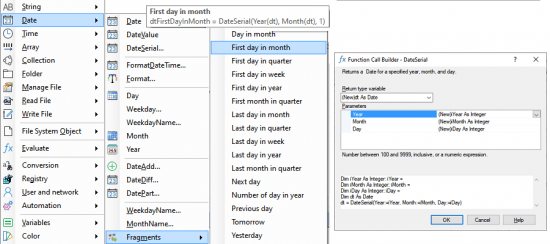
Code VBA 11.0.0.29
File size: 6.7 MB
Code VBA provides many productivity tools. On this page the focus is on the VBA Tools. Click on the subject below you are interested in for more details. The tiles below give you a more visual introduction.
VBA tools
Enhanced IntelliSense
Code Explorer
Comment out code
Errorhandler
Number lines
VBA code indenter
View macros
Get object name
Excel create macro button
Excel tools menu
MS Access tools menu
Dialogs menu
Object menu
Quick menu
F1 tooltip online help
Find procedure
Debug Print
Preferences
Shortcuts
Customize toolbar
VBA Code Generators
If statement inserters
Loop builder
Select Case builder
Multiline String builder
Folder builder
InputBox builder
MsgBox builder
SelectionBox
Date Picker dialogs
UserForm builder
Class builder
SQL VBA builder
MS Access class from table generator
MS Access recordset builder
Quick procedure
Procedure builder
Procedure call builder
Procedure call insertion
Property builder
Declare variable
Declare procedure parameters
Variable builder
Constant builder
Enum builder
Excel VBA macro recorder
Preferences
VB naming conventions
Code Library
snippet editor
snippet inserter
add module
add procedure
string functions
date functions
folder
manage file
read file
Code Explorer
The Code Explorer is a replacement for the VBA editor's built-in Project Explorer adding many additional features, such as easy navigation to procedures, starting a procedure using Run or from Immediate window, global renaming.
Get the name of an object
Getting the name of an object such as a folder or document or sheet can be invoked from the Name menu, as continuation in a String assignment, or in the Constant Builder.
Error Handler
The Error Handler with reporting component is added to your project when you specify in your procedure you want in case of run-time errors the user to send an email to you giving details on what happened.
Finding the procedure you need
Office applications involve thousands of methods and properties, making the one you need difficult to find. The Find menu option returns a list of procedures that use the word.
Inspect Object properties
In the Object menu it is possible to see the actual values of properties in the tooltip. Additionally you can have statements from the Object menu inserted into the Immediate window to run them there.
F1, Tooltips and online help
Menu tooltips and help are an important feature in Code VBA: The title summarizes the object or method; pressing F1 opens the web page with more information. Further, it shows what code will be inserted.
The Excel Application menu
The Excel Application menu gives you access to VBA code for the Excel Application class specific global procedures. Includes opening an existing - or creating a new workbook.
Excel Object menu
The Excel Object menu lets you instantly add VBA code from global object variables already present.
The Access Application menu
The Access Application menu gives you access to the most commonly used VBA code organized in the same way as on the MS Access ribbon plus a tool to easily create SQL.
HOMEPAGE
https://www.codevba.com/ DOWNLOAD
https://rapidgator.net/file/c23e7079950e30ef0f76ad96b2781548/Code_VBA_11.0.0.29.rar.html
https://nitroflare.com/view/8B2D67B378C1C74/Code_VBA_11.0.0.29.rar
https://nitroflare.com/view/8B2D67B378C1C74/Code_VBA_11.0.0.29.rar
We Recommend To See:




The minimum comment length is 20 characters. Respect yourself and others!